


Infrastructure power demand can drive up operating costs. If data center managers can meet the power needs of their CPU, storage, and cooling systems, they can cut utility bills.
Utilities are not a small data center expense. As part of the push to address IT spending, data center managers and organizations continue to look for ways to reduce data center energy costs and improve overall energy efficiency.
With so many infrastructure components using electricity, managers have several options to improve the energy efficiency of their data centers. Some of these options include adjusting fan speed, storage hardware, cloud infrastructure usage, and even operating temperature. These small changes can collectively reduce data center power consumption, resulting in significant energy savings.
Despite the potential for efficiency gains, administrators should account for any risks and obtain administrative support before adopting any of the following strategies to reduce data center power consumption. Without proper planning, high-density, efficient infrastructure can heat up a data center in seconds.
1. Use variable speed fans instead
One way to reduce energy use in data centers is to switch to variable speed fans. Recent studies have found that by reducing CPU fan speed, power consumption can be reduced by 20%. Therefore, organizations should use variable speed fans to cool data center equipment. These fans consume only power while operating and only operate at the desired speed based on complex thermostatic measures. Since these fans slow down when CPU utilization is low, they quickly reduce power consumption per blade that doesn't turn it.
Don't stay on the server; Check the cooling capabilities of UPS devices, power supply to various devices on the same grid, and any other hot spots where fans may be spinning.
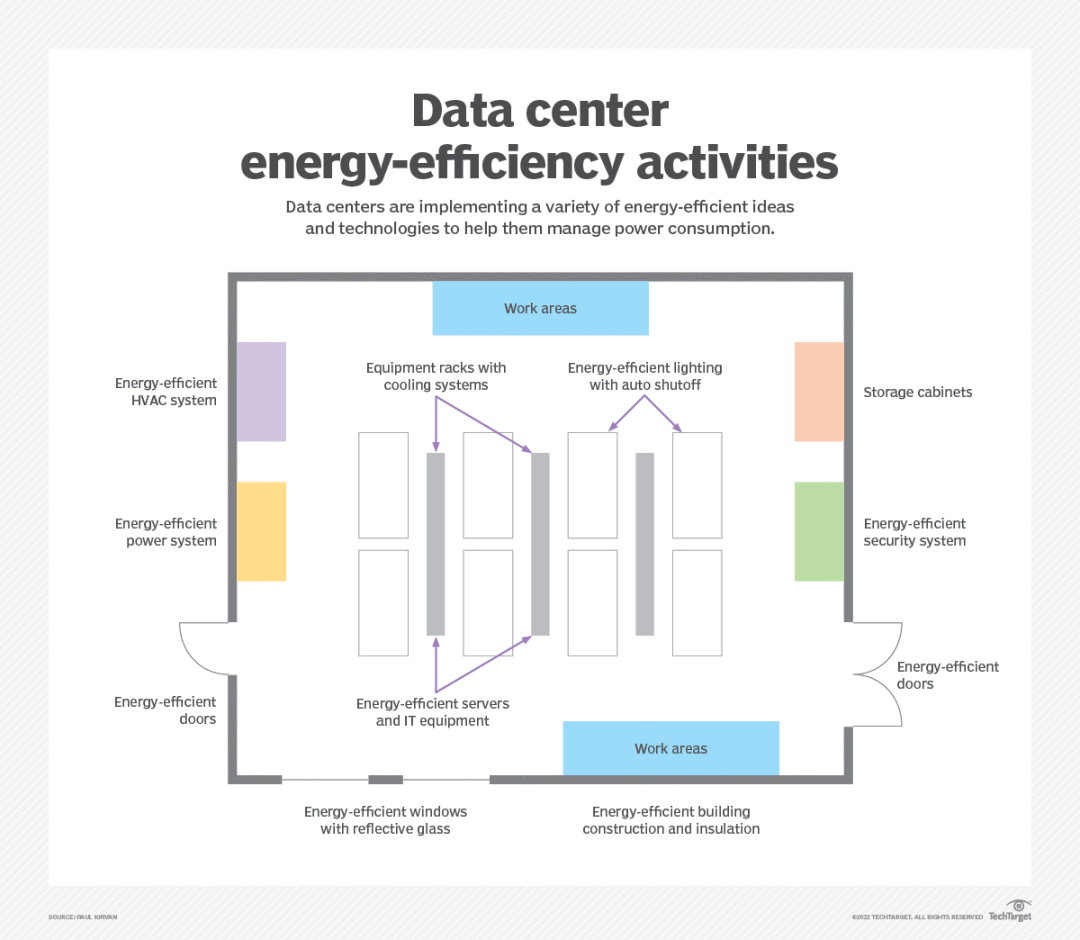
Data centers are using technologies such as energy-efficient HVAC systems and equipment racks with cooling systems to manage energy consumption
2. Use liquid cooling
Another way to reduce power consumption – especially for high-performance hardware – is to use liquid cooling for the CPU. Unlike fans that blow air through a radiator, liquid cooling works like a car's radiator, using liquid to dissipate heat.
Liquid cooling is widely considered more efficient than air-based cooling methods, and depending on the application, it may have the added benefit of noise reduction. Although the pump used for liquid cooling consumes some power, liquid cooling helps the CPU run cooler, which helps reduce the amount of energy needed to cool the data center.
3. Raise the temperature
Another way to achieve energy-efficient data centers is to reevaluate optimal data center temperatures. In the past, data centers had to be cool at all times for computing hardware to function properly. Recently, equipment suppliers have been designing systems that can operate at higher temperatures. According to data center infrastructure vendors, modern servers can perform well in temperatures up to 77 degrees Fahrenheit. Even so, some data centers run servers with temperatures close to 65 degrees Fahrenheit.
If the administrator raises the ambient temperature by a few degrees, the cooling system's power usage may drop immediately without any impact on server performance. No overhead or investment is required, but close temperature and server monitoring and pilot programs are recommended to avoid unpleasant surprises.
Administrators should not arbitrarily increase the temperature of the data center. ASHRAE's guidelines provide recommended operating standards for energy consumption, temperature, and humidity control.
4. Use a larger and slower drive
Using a larger, slower drive can be helpful, but it shouldn't be done for high-demand transaction processes like financial databases or critical 24-hour systems. If administrators delegate a portion of most of the unused files to a lower storage tier, they will be able to replace the faster units with low-energy drives. In turn, fewer drives consume less energy and produce less heat. This can be an expensive endeavor, but since most organizations add more storage space each quarter, it can be a worthwhile investment.
Organizations should also use the operating system's power management profile to put hard drives in standby mode when they are inactive. This reduces power consumption and extends the life of the hard drive.
5. Switch to SSD
Organizations should also consider replacing hard drives with SSDs where feasible. SSDs typically consume much less power than hard drives and offer more IOPS.
For example, Samsung's enterprise SSD consumes only 1.25 W of power in active mode and 0.3 W when idle. That's about a quarter of the power consumed by a 15,000 rpm SAS hard drive, which consumes about 6 W of power per drive. Additionally, SSDs don't have any moving parts, which means they generate much less heat than hard drives.
6. Use cloud-based services
Although moving IT workloads to the cloud or managed service providers externalizes power consumption to the host site, many organizations acknowledge that large vendors are experts at making the most of every kilowatt. Managed service providers often focus on providing customers with the best value for electricity at a lower cost.


